🎧 Overview
Spotify is a leading digital audio streaming service that gives you access to millions of songs, podcasts, and videos. Spotify is accessible for free with ads or through a paid Premium plan for ad-free listening, offline downloads, and higher audio quality. It allows users to create playlists, discover new music, and listen using various devices, including phones, computers, and tablets.
The Spotify Web API is a RESTful API with different endpoints that return JSON metadata about music artists, albums, and tracks, directly from the Spotify Data Catalog. It allows developers to build applications that interact with Spotify’s music data and features, allowing them to retrieve music information, manage playlists, control playback, and access user data through standard web requests (RESTful). It provides access to Spotify’s catalog (including artists, albums, and tracks), and user features, using authorization flows like Client Credentials for app data and Authorization Code for user-specific actions.
Common use cases
Access catalog information: Developers can retrieve metadata about artists, albums, tracks, and podcasts, including cover art, release dates, popularity ratings, and links to 30-second audio previews.
Create music statistics trackers: Third-party websites can analyze a user’s listening habits and display their top tracks, artists and listening history.
Automate playlist generation: Applications can automatically create new playlists, add or remove items, reorder tracks, and even upload custom cover images.
Create collaborative playlists: Applications can facilitate the creation of shared playlists for events like parties or weddings, where multiple users can contribute songs.
Control playback: Applications can control the playback state (play, pause, skip, or seek), manage the playback queue, and transfer playback between different Spotify Connect devices (like speakers or a phone).
Display profile data: Users can authorize third-party web applications to display their personal profile information and playlists.
Technical details
- Supports resource-oriented endpoints under https://api.spotify.com, such as /albums, /artists, /tracks, and /playlists.
- Supports standard HTTP methods: GET, POST, PUT, DELETE (204 responses when applicable).
- Exchanges data in UTF‑8 encoded JSON. Responses contain metadata for artists, tracks, playlists, playback state, etc.
- Uses JSON exclusively; XML/HTML not natively supported.
- Utilizes OAuth 2.0 with multiple flows for authentication and authorization, and requires the
Bearerheader with an access token.
Target audience
This guide is intended for developers who want to integrate Spotify features into web, mobile, or backend applications. It assumes familiarity with HTTP requests, JSON, and basic command-line tools, such as curl. No prior experience with OAuth 2.0 is required. The authentication section provides a clear, task‑oriented explanation to help new integrators get started quickly.
🔗 Base URL
All API requests are made to the following base URL. When constructing requests, append the endpoint paths to this root URL. For security, the API is served over HTTPS, and all endpoints are versioned.
https://api.spotify.com
🔐 Authentication
In the Spotify Web API, users grant consent for specific scopes to a registered client application. The application (server-side) authenticates to Spotify using its client ID and client secret (never exposed to end users) and requests access tokens to call the API. The server authenticates and authorizes the clients, and sends them access tokens, which are used by the clients to make API requests on behalf of the user or application.
Access to protected resources is determined by one or several scopes. Scopes allow the application to access specific functionality (such as reading a playlist, modifying your library, or streaming) on behalf of a user. The set of scopes set during authorization determines the access permissions that the user is asked to grant.
OAuth authorization framework in Spotify
Spotify implements the OAuth2 standard accordingly:
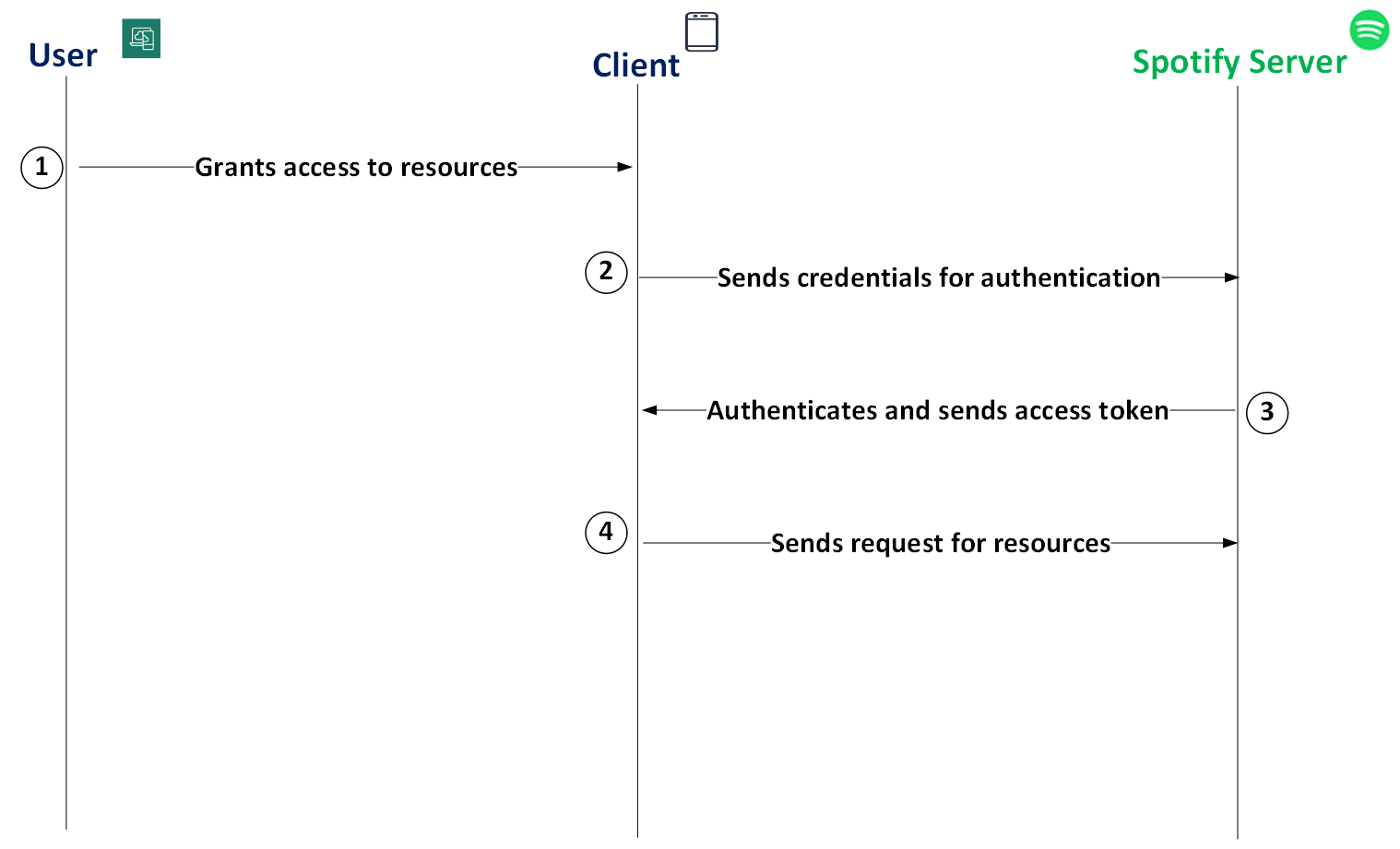
Spotify OAuth flow
| Seq.# | Source | Target | Description |
|---|---|---|---|
| 1 | User | Client | The Spotify user grants consent for requested scopes. Note: The client ID and client secret are obtained by the developer when creating the app, and not provided by the user. |
| 2 | Client | Spotify Server | To access the protected resources, the client first sends their credentials to the server. |
| 3 | Spotify Server | Client | The Spotify Server authenticates the client, and sends the client an access token. |
| 4 | Client | Spotify Server | The client uses the access token to send a request to access specific resources on behalf of the user or application. |
Spotify implements three OAuth grant types
The OAuth2 standard defines four grant types (or flows) for authentication. Spotify implements three of these grant types.
Select the right grant type for the application you are building:
Authorization Code: When developing a long-running application, like a web app running on the server, use this grant type, in which the user grants permission only once and the client secret can be safely stored.
Authorization Code with PKCE Extension: When developing a desktop app, mobile app, or JavaScript web app that run in a browser, the client secret is not safe. To provide protection against attacks where the authorization code can be intercepted, use this grant type.
Client Credentials: When developing applications that run on the backend, such as CLIs or daemons, the system authenticates and authorizes the app rather than the user. For these applications, Client Credentials is the typical choice. This grant type does not include user authentication, so only endpoints that do not request user information (such as profile data) can be accessed.
| Grant Type | Access User Resources? | Requires Secret Key? | Access Token Refresh? |
|---|---|---|---|
| Authorization Code | Yes | Yes | Yes |
| Authorization Code with PKCE | Yes | No | Yes |
| Client Credentials | No | Yes | No |
📊 Rate limits
A rate limit is the number of requests the API can receive in a specific time period. Rate limiting ensures efficient API performance and prevents abuse. Once the limit is reached, API requests from the client will fail.
Spotify applies rate limiting and returns 429 Too Many Requests when your app exceeds allowed thresholds. The exact limits are not publicly documented and may vary by app. Use the Retry-After response header to back off and retry after the indicated number of seconds.
429 error response
Use the information in the 429 response to slow down the number of API requests that it makes to the Web API. The header of the 429 response includes a Retry-After parameter with a value in seconds. Consider waiting for the number of seconds before your app calls the Web API again.
For example, the following 429 response contains a Retry-After header set to 30 seconds:
{
  "headers": {
    "Retry-After": "30"
  },
  "body": {
    "error": {
      "code": "rate_limited",
      "message": "Too many requests. Try again later.",
      "request_id": "req_xR72m3"
    }
  }
}
App access modes (user access quotas)
These modes control which users can access your app, and not the per‑second rate limit:
Development mode (default): Your app can be used by up to 25 specified Spotify users you add in User Management.
Extended access (via review): After a successful partner/review process, your app can be used by a broader set of users. Individuals cannot apply. This is for organizations with approved use cases.
Define authenticated users in development mode
When you first create an app from the Spotify Developer Dashboard, the default quota mode is development mode. You can define authenticated users for the app, including testers, friends, or fellow developers.
Before you begin
Complete the getting started tasks:
Procedure:
From the Dashboard page, select the app for which you want to define authenticated users.
On the next page, select the User Management tab.
In the Full Name and Email fields, enter the name and email address of the first user you want to add, and select Add user.
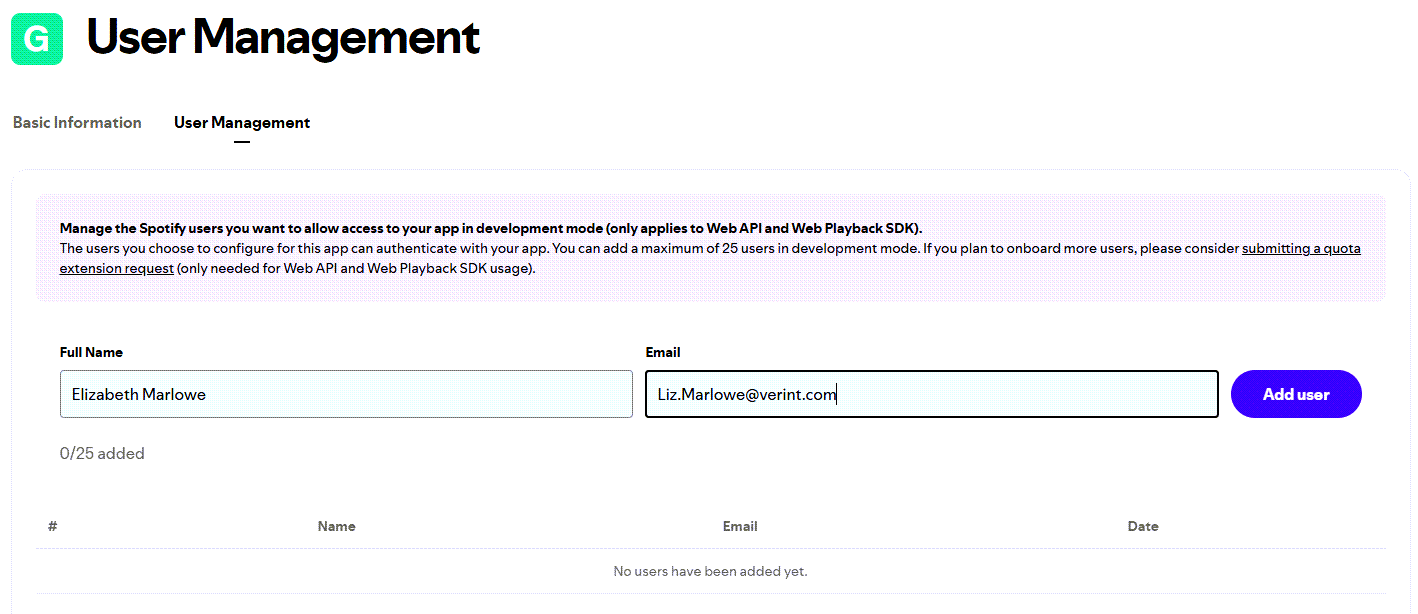
Add user to authenticate with your app
The user you added can now authenticate with your app. You can define a total of 25 authenticated users in development mode. To define an unlimited number of users, apply for extended quota mode.
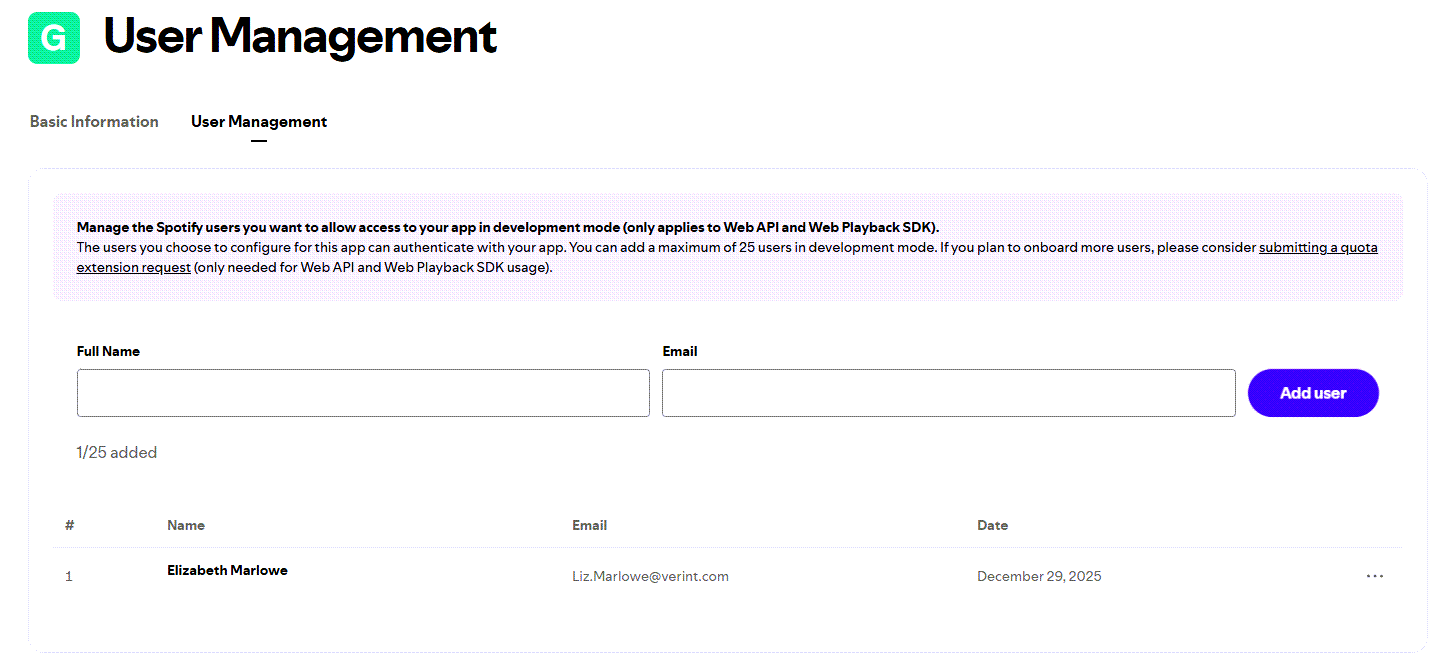
Authenticated user added
Apply for extended quota mode
If you want your app to be used by many Spotify users at the same time, your organization can apply for the extended quota mode, which has a much higher rate limit than development mode.
To apply for this mode, your business or organization first needs to be an approved Spotify partner, which involves completing and submitting a Partner Application Form. Upon approval, you can then complete and submit a Quota Extension Request Form from the Developer Dashboard. The Spotify App Review Team reviews your request, tests your app and sends you feedback via email about your request.
Before you begin
Complete the getting started tasks:
Verify that your organization or business:
Is an established business entity (legally registered business or organization)
Operates an active, launched service
Maintains a minimum of at least 250K active users
Is available in key Spotify markets
Procedure:
Complete the Partner Application Form.
Spotify will review your submitted form and send a response by email. If Spotify approves your Partner Application Form, continue to the next step.
From the Dashboard page, select the app for which you want to request extended quota mode.
From the Quota Extension Request tab, complete the Quota Extension Request Form, which includes four main sections.
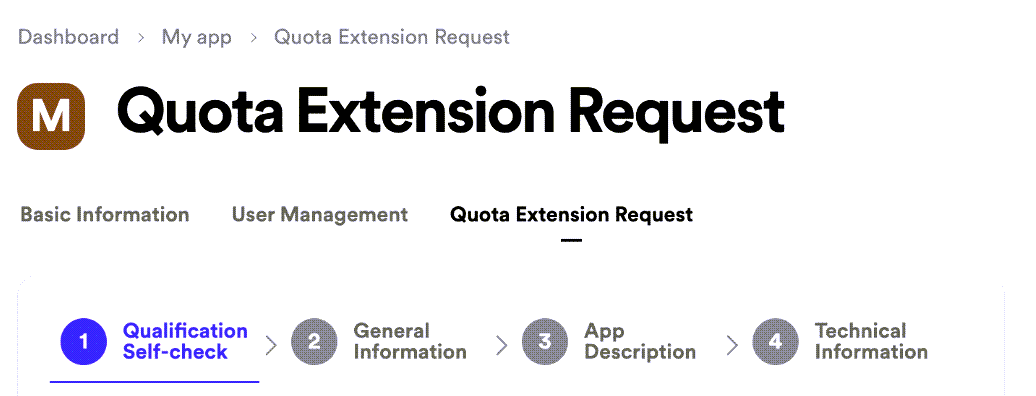
Quota Extension Request Form
When you have completed the form, select Submit.
If you have successfully submitted your app for review, Sent is displayed in blue on your app detail page. The app review team will review your form, evaluate it for compliance with Spotify’s Developer Policy, and send you feedback to the email address associated with your Spotify account. This review process can take up to 6 weeks.
Rate limit techniques
Use extended quota mode: If you want your app to be used by many Spotify users at the same time, apply for extended quota mode.
Use batch APIs: Some Spotify APIs, such as the Get Multiple Albums endpoint, allow you to fetch a batch of data in one API request. If you know you will need data from a set of objects, reduce your API requests by calling the batch APIs.
Analyze your app request volume: On the Developer Dashboard, on your app’s detail page, a graph displays data about your API request volume over time. To avoid exceeding the rate limit, understand the anomalies in your API requests and the reasons for them. For example, if you notice that your website receives a surge in traffic after you send out your weekly newsletter, you can stagger the delivery of the emails over a longer period of time.
Use lazy loading features: Make API calls conditional on user interactions, such as selecting a Learn more link or scrolling to a defined region of a web page. Most users do not want to use every feature that is available to them on a web page or mobile app. This technique avoids making unnecessary API requests.
⚠️ HTTP status and error codes
Spotify’s Web API follows standard HTTP status codes, paired with JSON responses.
Common HTTP status codes
| Code | Description | When It Occurs |
|---|---|---|
| 200 | OK | Successful GET requests, returns data |
| 201 | Created | Successful POST creating a resource |
| 202 | Accepted | Request accepted, processing pending |
| 204 | No Content | Successful request with no body (such as DELETE) |
| 304 | Not Modified | Caching: resource unchanged |
| 400 | Bad Request | Malformed syntax or invalid data |
| 401 | Unauthorized | Missing or invalid credentials |
| 403 | Forbidden | Authenticated but lacks permissions |
| 404 | Not Found | Resource does not exist |
| 429 | Too Many Requests | Rate limiting in effect |
| 500 | Internal Server Error | Server error - report if happens frequently |
| 502 | Bad Gateway | Error from upstream server |
| 503 | Service Unavailable | Temporary server unavailability |
Error response format
Most error codes (4xx or 5xx) adhere to this JSON format:
{
  "error": {
    "status": 401,
    "message": "Invalid access token"
  }
}
↕️ Pagination
Pagination allows you to retrieve large sets of data in smaller, manageable chunks by using specific parameters to limit the amount of data sent in each API response.
The Spotify Web API uses an offset-based paging model for endpoints that return multiple items (such as tracks, artists, and playlists).
Responses include a Paging object with the following parameters:
items: Array of the current page’s objectslimit: Maximum number of items per page. (The maximumlimitvalue is 50 for most endpoints.)offset: Index where the page startstotal: Total count of all matching itemsnext: URL of the next page (or null)previous: URL of the previous page (or null)
Note the following:
Use the
nextandpreviousURLs instead of manually calculating offsets.To retrieve more pages, request the URL provided by the
nextparameter.To control page size and the starting point, use the
limitandoffsetparameters.
Example: API request and response using pagination
Here’s how to request the second page of playlists and what the response looks like:
curl "https://api.spotify.com/v1/me/playlists?offset=20&limit=20" \
     -H "Authorization: Bearer <access_token>"
{
  "href": "https://api.spotify.com/v1/me/playlists?offset=20&limit=20",
  "items": [ ... ],
  "limit": 20,
  "next": "https://api.spotify.com/v1/me/playlists?offset=40&limit=20",
  "offset": 20,
  "previous": "https://api.spotify.com/v1/me/playlists?offset=0&limit=20",
  "total": 85
}
🚀 Getting started
From the Spotify Developer Dashboard, set up your account. Then, create your first app, which provides you with a client ID and client secret. Finally, request an access token, which is a string that contains the credentials and permissions you need to access a given resource.
Every access token is valid for 1 hour. Include the Authorization header in your API requests using: Bearer <access_token>.
Set up your account
Set up your Spotify Web API account on the Spotify Developer Dashboard.
Procedure
Go to the Spotify for Developers page.
Select Log in.
Under Don’t have an account?, select Sign up.
Do one of the following:
Type your email address and select Next.
Select Sign up with Google and select an existing Google account.
From the Spotify for Developers page, from your username, select Dashboard.
Read the Spotify Developer Terms page and select Accept the terms.
The system displays the Dashboard page. You can now create an app.
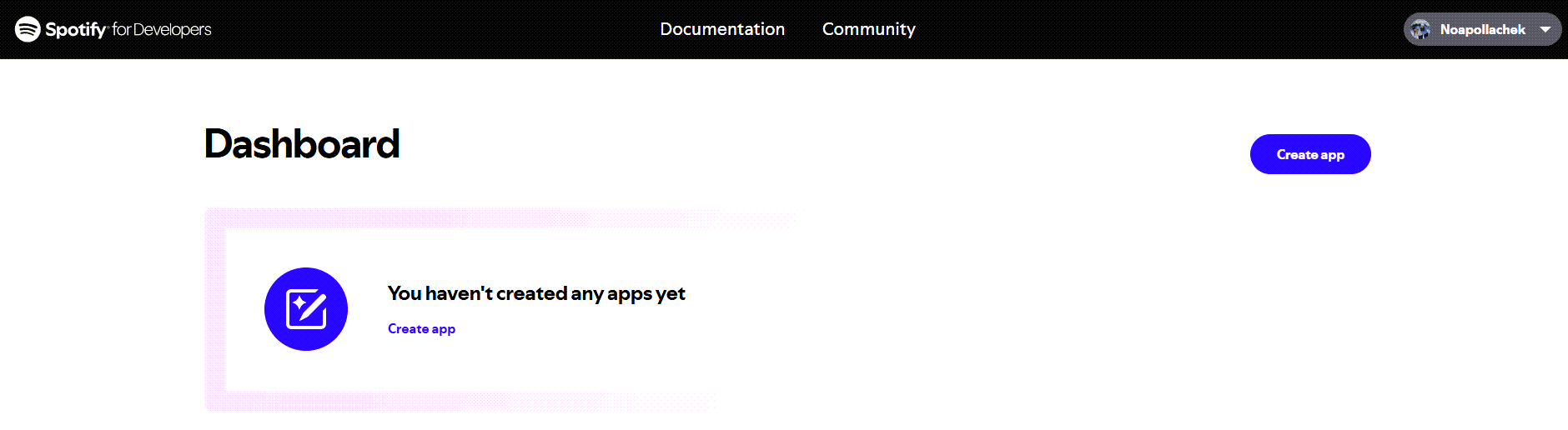
New account on the Spotify Dashboard page
Create an app
After you set up your account, you can create your first app on the Spotify Developer Dashboard.
An app provides the client ID and client secret you need to request an access token, which is used to access any resource (such as artists, albums, or tracks) or user data (for example, your profile or playlists).
Before you begin
Procedure
From the Spotify for Developers page, select Create app.
On the Create app page, complete the fields.
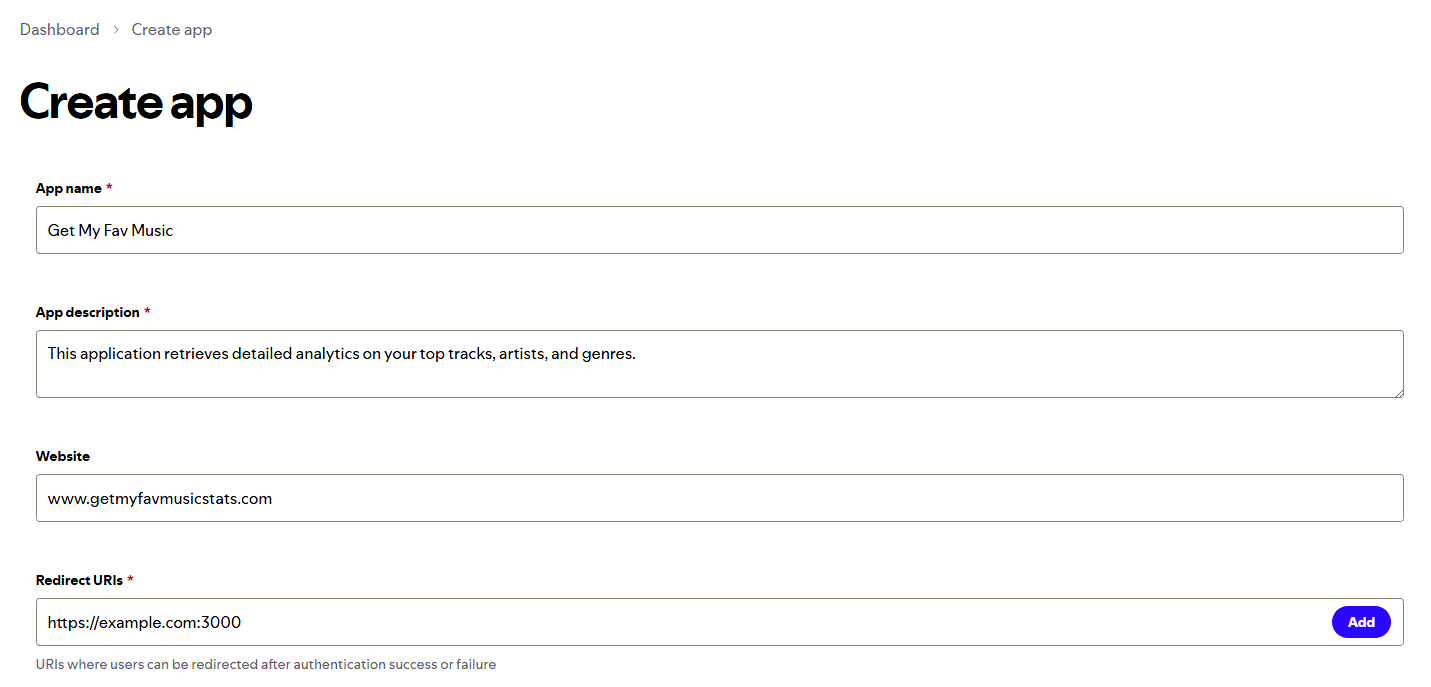
Create New App - Add Redirect URIs
Field Description App name Enter the name of the application. App description Enter a description of the application. Website Optional_. Enter the Web domain or URL that allows users to get more information about your application. Redirect URIs Enter one or more URIs where users can be redirected after authentication success or failure, and select Add.
These URIs enable the Spotify authentication service to automatically invoke your app every time the user logs in. For example: http://127.0.0.1:8080/.
Note that on iOS apps, the redirect URI must adhere to the following:- All of the characters are lowercase.
- Prefix must be unique to your application. (It cannot be a general prefix like http.) NOTE: The prefix must only be used by your application for authenticating Spotify. If you already have a URL scheme handled by your application for other uses, do not reuse it.
- Include a path after the first pair of forward slashes.
For example, if your app name is Get My Fav Music Stats, a good candidate for the redirect URI could be:get-my-fav-music-stats-login://callback.
Which API/SDKs are you planning to use? Select the type of APIs/SDKs you are planning to use for the app. I understand and agree with Spotify’s Developer Terms of Service and Design Guidelines. Select the terms of service. Select Save.
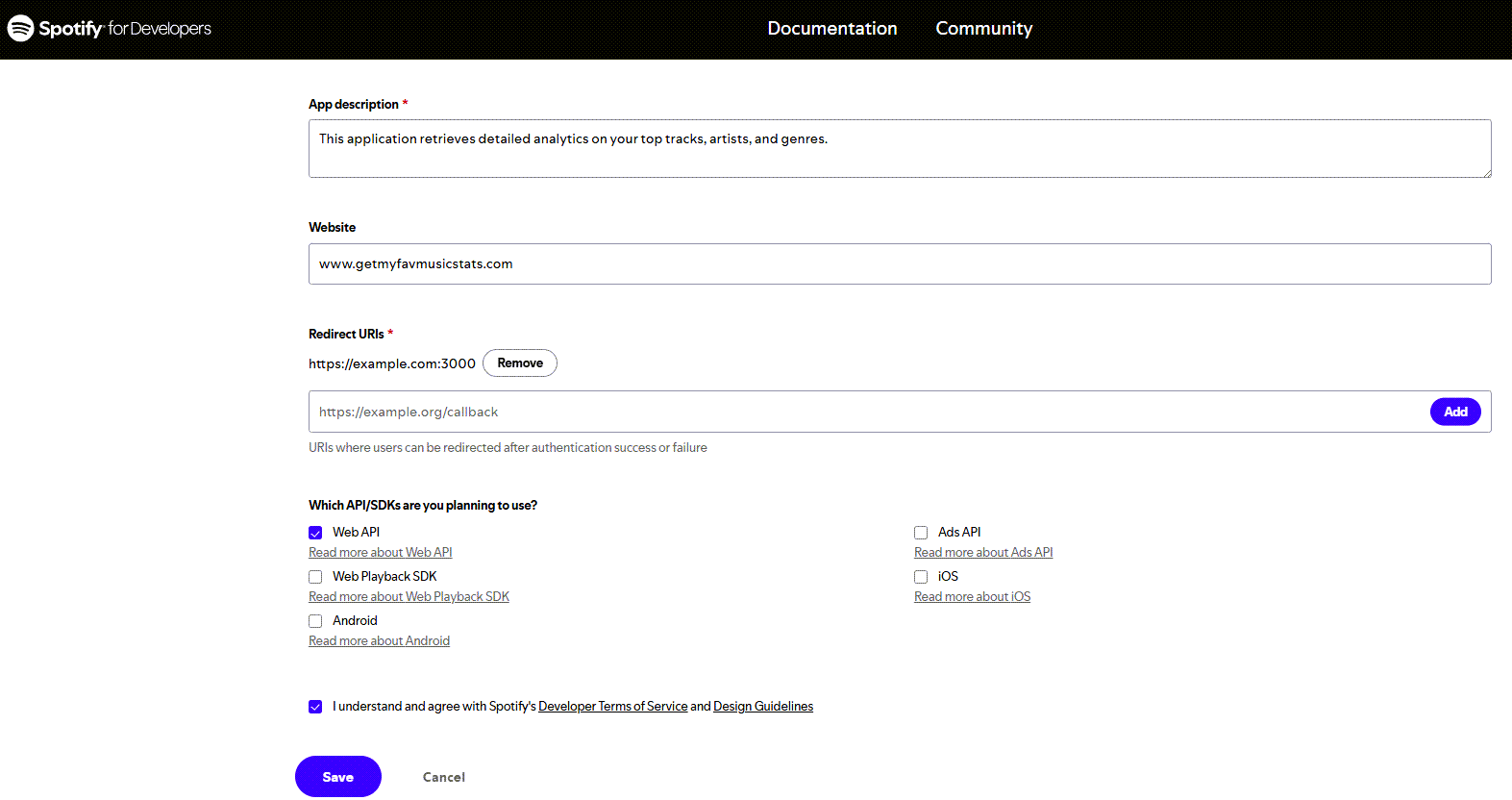
Save New App Settings
The application adds the app you created.
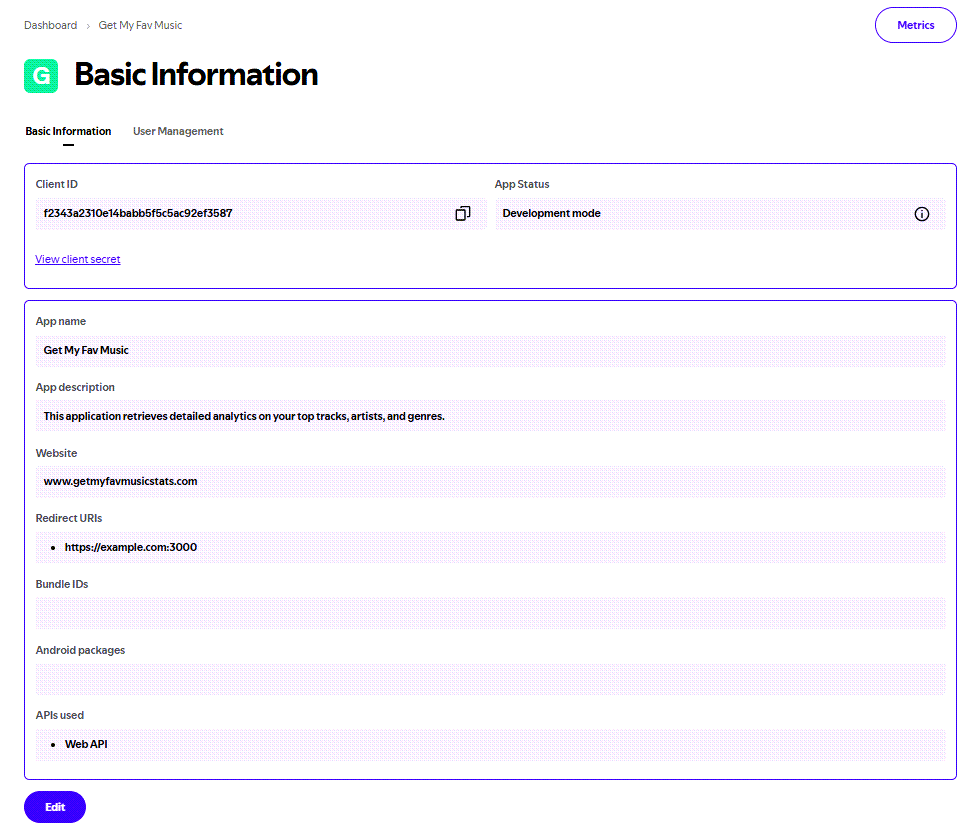
New App Created
By default, every app you create starts in development mode, which limits usage to up to 25 specified users. If you want to share your app with up to 25 users, define authenticated users in development mode.
However, if you want to define an unlimited number of users, your organization can apply for extended quota mode. For details on both modes, see App access modes (user access quotas).
Request an access token
You can now request an access token, which is a string that contains the credentials and permissions used to access a given resource (such as artists, albums, or tracks) or user data (for example, your profile or playlists).
Spotify uses the OAuth2 standard for authorization, which defines four grant types (or flows) to request and get an access token. Spotify implements three of them: Authorization Code, Authorization Code with PKCE Extension, and Client Credentials. This getting started task utilizes the Client Credentials flow. For more information, see Spotify implements three OAuth grant types.
Before you begin
Verify that curl is installed on your computer:
- For macOS/Linux, it is usually pre-installed.
- For Windows, download and install curl or use Git Bash.
Curl is a command-line tool used to transfer data to or from a server using various protocols - most commonly HTTP and HTTPS.
Procedure
From the Dashboard, select the app you just created.
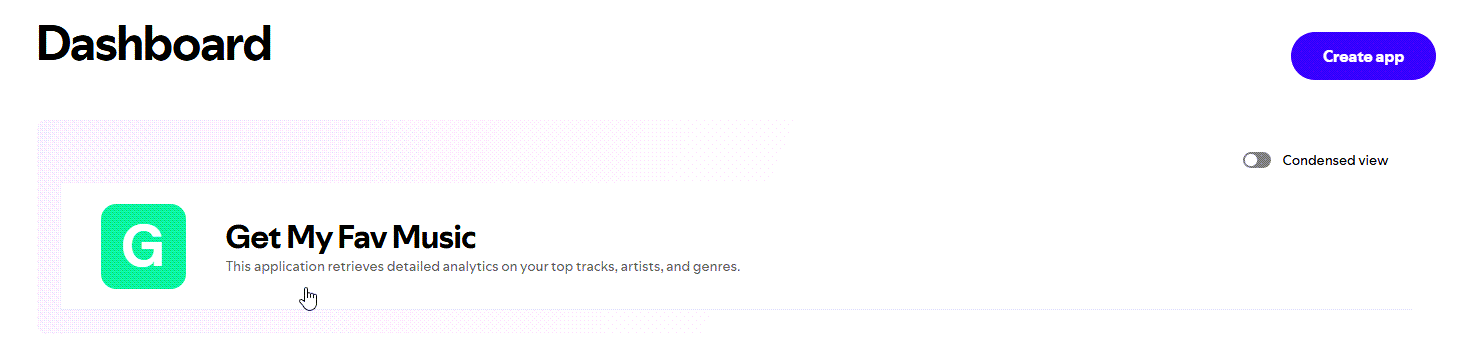
Select new app from dashboard
From the Basic Information tab, access your client ID and client secret:
Client ID: The client ID is displayed in the Client ID field. To copy it, click the copy icon in the corner.
Client Secret: To view the client secret, select View client secret. To copy it, click the copy icon in the corner.
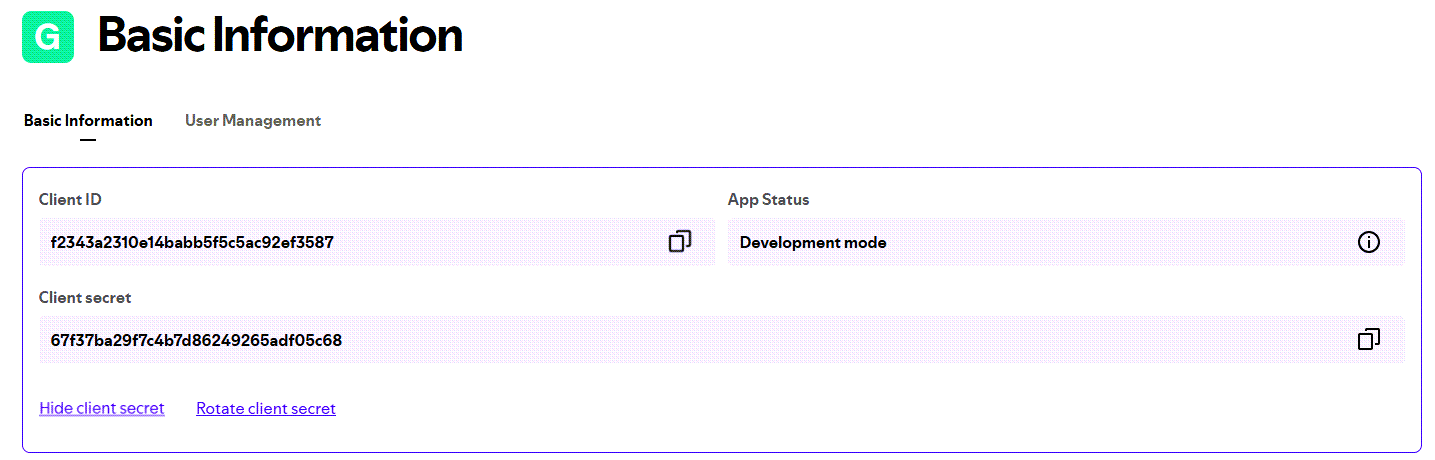
View client ID and client secret
Using the Client Credentials authorization flow, send an API request with the following information:
- Send a POST request to the token endpoint URI.
- Add the
Content-Typeheader: application/x-www-form-urlencoded. - Add an
Authorizationheader using HTTP Basic withbase64(client_id:client_secret). - Set the body parameter:
grant_type=client_credentials.
curl -X POST "https://accounts.spotify.com/api/token" \
 -H "Content-Type: application/x-www-form-urlencoded" \
 -H "Authorization: Basic <base64(client_id:client_secret)>" \
 -d "grant_type=client_credentials"
The response returns an access token that is valid for 1 hour (or 3600 seconds). After that time, the token expires and you need to request a new one.
{
  "access_token": "BQDBKJ5eo5jxbtpWjVOj7ryS84khybFpP_lTqzV7uV-T_m0cTfwvdn5BnBSKPxKgEb11",
  "token_type": "Bearer",
  "expires_in": 3600
}
To use the access token, you must include the
Authorizationheader in your API requests, where the value is the valid access token following the format:Bearer <Access Token>.
🎤 Tutorial: Request artist data
This tutorial describes how to retrieve information about an artist. It involves appending the Spotify ID of the artist to the Get Artist endpoint, and including the access token using the Authorization header in the API request.
The request includes using curl (Client URL) for the HTTP request.
Before you begin
Complete all of the Getting started tasks, including setting up an account, creating an app, and requesting an access token.
Step 1: Get the Spotify ID of an artist
For the Get Artist endpoint, you need the Spotify ID of the artist.
Use the Spotify Desktop App to get the Spotify ID:
Search for the artist.
From the artist profile, click the 3 dots icon.
Select Share > Copy link to artist.
The Spotify ID is the final path segment in the URL, after
open.spotify.com/artist/. For example, inhttps://open.spotify.com/artist/4Z8W4fKeB5YxbusRsdQVPb, the ID is4Z8W4fKeB5YxbusRsdQVPb.
Step 2: Start the API request with the Get Artist endpoint
Append the Spotify ID to the Get Artist endpoint (https://api.spotify.com/v1/artists/{artist_id}).
For example:
curl "https://api.spotify.com/v1/artists/4Z8W4fKeB5YxbusRsdQVPb" \
Step 3: Include the access token in the API request
Include an access token (recently generated) using the Authorization header.
For example:
curl "https://api.spotify.com/v1/artists/4Z8W4fKeB5YxbusRsdQVPb" \
     -H "Authorization: Bearer BQDBKJ5eo5jxbtpWjVOj7ryS84khybFpP_lTqzV7uV-T_m0cTfwvdn5BnBSKPxKgEb11"
Step 4: Verify a successful response
Verify that the API returns a successful JSON response, which includes information about the artist.
📘 API reference
The Spotify Web API Reference is designed to help developers integrate Spotify features into applications by providing clear examples, endpoint details, and request/response formats.
API reference overview
The API reference provides curated examples of Spotify Web API endpoints for portfolio purposes. Endpoints are grouped by resource type for easier navigation.
Each endpoint includes the following data:
- Description or purpose of the endpoint
- HTTP method
- Endpoint
- Request syntax
- Query parameters
- Request example
- Response example
- Response elements
Resource groups and endpoints
The following table summarizes the resource groups and their associated endpoints included in this guide:
| Resource Group | Description | Endpoint | Description |
|---|---|---|---|
| Albums 🎵 | Endpoints related to retrieving metadata for a single or multiple music albums, including tracks, artists, and availability by market. | Get album | Retrieves Spotify catalog information for a single album. |
| Save albums for current user | Saves one or more albums to the current user’s music library. | ||
| Remove a user’s saved albums | Removes one or more albums from the current user’s music library. | ||
| Artists 👤 | Endpoints related to retrieving Spotify catalog information for a single or multiple artists by their unique Spotify IDs. | Get several artists | Retrieves Spotify catalog information for several artists based on their Spotify IDs. |
| Get artist’s top tracks | Retrieves Spotify catalog information about an artist’s top tracks by country. | ||
| Player ▶️ | Endpoints related to performing playback actions on a specific device. | Get available devices | Retrieves information about a user’s available Spotify Connect devices. |
| Pause playback | Pauses playback on a user’s account. | ||
| Skip to next | Skips to the next track in the user’s queue. | ||
| Playlists 📂 | Endpoints related to performing actions on a specific playlist owned by a Spotify user. | Get playlist | Retrieves a playlist owned by a Spotify user. |
| Update playlist items | Reorders or replaces items in a playlist, depending on the request parameters. | ||
| Add items to playlist | Adds one or more items to a user’s playlist. | ||
| Remove playlist items | Removes one or more items from a user’s playlist. |
Headers
The following headers are commonly used:
| Header Name | Description | Required | Notes |
|---|---|---|---|
Authorization | Sends the access token to the API. | required | Value is: Bearer <access_token> |
Content-Type | Media type of the request body. | conditional | Note:
|
Error responses
All endpoints return errors in a consistent JSON format when something goes wrong. The response includes an error object with two fields:
status: HTTP status code (integer)message: Human-readable description of the error (string)
For example:
{
  "error": {
    "status": 401,
    "message": "Invalid access token"
  }
}
For more information, see HTTP Status and Error Codes.
Albums 🎵
Endpoints related to retrieving metadata for a single or multiple music albums, including tracks, artists, and availability by market.
Endpoints
Get album
Retrieves Spotify catalog information for a single album.
Method
GET
Endpoint
https://api.spotify.com/v1/albums/{id}
Request syntax
GET https://api.spotify.com/v1/albums/{id}

Authorization: Bearer <access_token>
Query parameters
| Parameter | Description | Type | Required | Notes |
|---|---|---|---|---|
id | Spotify ID of the album. | string | required | The Spotify ID is the base-62 identifier found at the end of the Spotify URI for an album. To get the Spotify ID of an album, from the Spotify Desktop Client, right-click on the album name. For example: 6rqhFgbbKwnb9MLmUQDhG6 |
market | ISO 3166-1 alpha-2 country code | string | optional | Note:
|
Request example
curl --request GET \
  --url https://api.spotify.com/v1/albums/4aawyAB9vmqN3uQ7FjRGTy \
  --header 'Authorization: Bearer 1POdFZRZbvb...qqillRxMr2z'
Response example
{
  "album_type": "compilation",
  "total_tracks": 9,
  "available_markets": ["CA", "BR", "IT"],
  "external_urls": {
    "spotify": "string"
  },
  "href": "string",
  "id": "2up3OPMp9Tb4dAKM2erWXQ",
  "images": [
    {
      "url": "https://i.scdn.co/image/ab67616d00001e02ff9ca10b55ce82ae553c8228",
      "height": 300,
      "width": 300
    }
  ],
  "name": "string",
  "release_date": "1981-12",
 "release_date_precision": "month",
  "restrictions": {
    "reason": "market"
  },
  "type": "album",
  "uri": "spotify:album:2up3OPMp9Tb4dAKM2erWXQ",
  "artists": [
    {
      "external_urls": {
        "spotify": "string"
      },
      "href": "string",
      "id": "string",
      "name": "string",
      "type": "artist",
      "uri": "string"
    }
  ],
"tracks": {
  "href": "https://api.spotify.com/v1/albums/2up3OPMp9Tb4dAKM2erWXQ/tracks?offset=0&limit=20",
  "limit": 20,
  "next": "https://api.spotify.com/v1/albums/2up3OPMp9Tb4dAKM2erWXQ/tracks?offset=20&limit=20",
  "offset": 0,
  "previous": "https://api.spotify.com/v1/albums/2up3OPMp9Tb4dAKM2erWXQ/tracks?offset=0&limit=20",
  "total": 4,
  "items": [
      {
        "artists": [
          {
            "external_urls": {
              "spotify": "string"
            },
            "href": "string",
            "id": "string",
            "name": "string",
            "type": "artist",
            "uri": "string"
          }
        ],
        "available_markets": ["string"],
        "disc_number": 0,
        "duration_ms": 0,
        "explicit": false,
        "external_urls": {
          "spotify": "string"
        },
        "href": "string",
        "id": "string",
        "is_playable": false,
        "linked_from": {
          "external_urls": {
            "spotify": "string"
          },
          "href": "string",
          "id": "string",
          "type": "string",
          "uri": "string"
        },
        "restrictions": {
          "reason": "string"
        },
        "name": "string",
        "preview_url": "string",
        "track_number": 0,
        "type": "string",
        "uri": "string",
        "is_local": false
      }
    ]
  },
  "copyrights": [
    {
      "text": "string",
      "type": "string"
    }
  ],
  "external_ids": {
    "isrc": "string",
    "ean": "string",
    "upc": "string"
  },
  "genres": [],
  "label": "string",
  "popularity": 0
}
Response elements
| Element | Description | Type | Notes |
|---|---|---|---|
album_type | Type of the album. | string | Valid values: album, single, compilation. Example: compilation |
total_tracks | Number of tracks in the album. | integer | Example: 9 |
available_markets | Markets in which the album is available: ISO 3166-1 alpha-2 country code. | array of strings | An album is considered available in a market when at least 1 of its tracks is available in that market. |
external_urls | external_urls object. | object | Known external URLs for the album. |
external_urls.spotify | Spotify URL for the object. | string | Example: http://open.spotify.com/track/6rqhFgbbKwnb9MLmUQDhG6 |
href | Link to the Web API endpoint, providing full details of the album. | string | |
id | Spotify ID of the album. | string | Example: 2up3OPMp9Tb4dAKM2erWXQ |
images | Array of images objects. | array of objects | Cover art for the album in various sizes, widest first. |
images.url | Source URL of the image. | string | Example: https://i.scdn.co/image/ab67616d00001e02ff9ca10b55ce82ae553c8228 |
images.height | Image height in pixels. | integer | Example: 300 |
images.width | Image width in pixels. | integer | Example: 300 |
name | Name of the album. | string | The value could be an empty string. |
release_date | Date the album was first released. | string | Example: 1981-12 |
release_date_precision | Precision with which the release date is known. | string | Valid values: year, month, day. Example: month |
restrictions | Included in the response when a content restriction is applied. | object | |
restrictions.reason | Reason for the restriction. | string | Albums can be restricted if the content is not available in a given market, or when the user’s account is set to not play explicit content. Additional reasons might be added in the future. Valid values: market, product, explicit |
type | Object type. | string | Valid values: album |
uri | Spotify URI for the album. | string | Example: spotify:album:2up3OPMp9Tb4dAKM2erWXQ |
artists | Artists of the album. | array of artist objects | Each artist object includes a link in href to more detailed information about the artist. |
artists.external_urls | Known external URLs for the artist. | object | |
artists.href | Link to the Web API endpoint, providing full details of the artist. | string | |
artists.id | Spotify ID for the artist. | string | |
artists.name | Name of the artist. | string | |
artists.type | Object type. | string | Valid values: artist |
artists.uri | Spotify URI for the artist. | string | |
tracks | Tracks of the album. | object | |
tracks.href | Link to the Web API endpoint, returning the full result of the request. | string | Example: https://api.spotify.com/v1/albums/{album_id}/tracks?offset=0&limit=20 |
tracks.limit | Maximum number of items in the response (as set in the query or by default). | integer | Example: 20 |
tracks.next | URL of the next page of items. | string | Example: https://api.spotify.com/v1/albums/{album_id}/tracks?offset=20&limit=20 |
tracks.offset | Offset of the items returned (as set in the query or by default). | integer | Example: 0 |
tracks.previous | URL of the previous page of items. | string | Example: https://api.spotify.com/v1/albums/{album_id}/tracks?offset=0&limit=20 |
tracks.total | Total number of items available to return. | integer | Example: 4 |
copyrights | Copyright statements of the album. | array of copyright objects | |
copyrights.text | Copyright text for this content. | string | |
copyrights.type | Type of copyright. | string | Valid values: C (the copyright), P (sound recording or performance copyright) |
label | Label associated with the album. | string | |
popularity | Popularity of the album. | integer | Valid values: 0-100, where 100 is the most popular. |
Save albums for current user
Saves one or more albums to the current user’s music library.
Method
PUT
Endpoint
https://api.spotify.com/v1/me/albums
Request syntax
PUT https://api.spotify.com/v1/me/albums

Authorization: Bearer <access_token>
Query parameters
| Parameter | Description | Type | Required | Notes |
|---|---|---|---|---|
ids | Comma-separated list of the Spotify IDs for albums. | string | required | Maximum number of IDs: 20. Example:ids= 382ObEPsp2rxGrnsizN5TX,1A2GTWGtFfWp7KSQTwWOyo,2noRn2Aes5aoNVsU6iWThc |
PUT body
| Element | Description | Type | Required | Notes |
|---|---|---|---|---|
ids | JSON array of Spotify IDs. | array of strings | optional | A maximum of 50 items can be specified in one request. Example: “4iV5W9uYEdYUVa79Axb7Rh”, “1301WleyT98MSxVHPZCA6M”. If the ids parameter is present in the query string, any IDs listed in the body are ignored. |
Request example
curl --request PUT \
  --url 'https://api.spotify.com/v1/me/albums?ids=382ObEPsp2rxGrnsizN5TX%2C1A2GTWGtFfWp7KSQTwWOyo%2C2noRn2Aes5aoNVsU6iWThc' \
  --header 'Authorization: Bearer 1POdFZRZbvb...qqillRxMr2z' \
  --header 'Content-Type: application/json' \
  --data '{
    "ids": [
        "string"
    ]
}'
Response example
If successful (200 status code), the album is saved.
Remove a user’s saved albums
Removes one or more albums from the current user’s music library.
Method
DELETE
Endpoint
https://api.spotify.com/v1/me/albums
Request syntax
DELETE https://api.spotify.com/v1/me/albums

Authorization: Bearer <access_token>
Query parameters
| Parameter | Description | Type | Required | Notes |
|---|---|---|---|---|
ids | Comma-separated list of the Spotify IDs for albums. | string | required | Maximum number of IDs: 20. Example: ids= 382ObEPsp2rxGrnsizN5TX,1A2GTWGtFfWp7KSQTwWOyo,2noRn2Aes5aoNVsU6iWThc |
DELETE body
| Element | Description | Type | Required | Notes |
|---|---|---|---|---|
ids | JSON array of Spotify IDs. | array of strings | optional | A maximum of 50 items can be specified in one request. Example: “4iV5W9uYEdYUVa79Axb7Rh”, “1301WleyT98MSxVHPZCA6M”. If the ids parameter is present in the query string, any IDs listed in the body are ignored. |
Request example
curl --request DELETE \
  --url 'https://api.spotify.com/v1/me/albums?ids=382ObEPsp2rxGrnsizN5TX%2C1A2GTWGtFfWp7KSQTwWOyo%2C2noRn2Aes5aoNVsU6iWThc' \
  --header 'Authorization: Bearer 1POdFZRZbvb...qqillRxMr2z' \
  --header 'Content-Type: application/json' \
  --data '{
    "ids": [
        "string"
    ]
}'
Response example
If successful (200 status code), the specified albums have been removed from the library.
Artists 👤
Endpoints related to retrieving Spotify catalog information for a single or multiple artists by their unique Spotify IDs.
Endpoints
Get several artists
Retrieves Spotify catalog information for several artists based on their Spotify IDs.
Method
GET
Endpoint
https://api.spotify.com/v1/artists
Request syntax
GET https://api.spotify.com/v1/artists


Authorization: Bearer <access_token>
| Parameter | Description | Type | Required | Notes |
|---|---|---|---|---|
ids | Comma-separated list of Spotify artist IDs. | string | required | Maximum number of IDs: 50. Example: ids= 2CIMQHirSU0MQqyYHq0eOx,57dN52uHvrHOxijzpIgu3E,1vCWHaC5f2uS3yhpwWbIA6 |
Request example
curl --request GET \
  --url 'https://api.spotify.com/v1/artists?ids=2CIMQHirSU0MQqyYHq0eOx%2C57dN52uHvrHOxijzpIgu3E%2C1vCWHaC5f2uS3yhpwWbIA6' \
  --header 'Authorization: Bearer 1POdFZRZbvb...qqillRxMr2z'
Response example
{
  "artists": [
    {
      "external_urls": {
        "spotify": "string"
      },
      "followers": {
        "href": null,
        "total": 0
      },
      "genres": [
        "Prog rock",
        "Grunge"
      ],
      "href": "string",
      "id": "string",
      "images": [
        {
          "url": "https://i.scdn.co/image/ab67616d00001e02ff9ca10b55ce82ae553c8228",
          "height": 300,
          "width": 300
        }
      ],
      "name": "string",
      "popularity": 0,
      "type": "artist",
      "uri": "string"
    }
  ]
}
Response elements
| Element | Description | Type | Notes |
|---|---|---|---|
artists | Array of artist objects. | array | |
artists.external_urls | Known external URLs for this artist. | object | |
artists.external_urls.spotify | Spotify URL of the object. | string | |
artists.followers | Information about the followers of the artist. | object | |
artists.followers.href | Currently not supported in the Web API. | string | This parameter is always set to null. |
artists.followers.total | Total number of followers. | integer | |
artists.genres | List of the genres with which the artist is associated. | array of strings | If not yet classified, the array is empty. Example: [“Prog rock”,“Grunge”] |
artists.href | Link to the Web API endpoint that provides full details of the artist. | string | |
artists.id | Spotify ID for the artist. | string | |
artists.images | Images of the artist in various sizes, widest first. | array of image objects | |
artists.images.url | Source URL of the image. | string | Example: “https://i.scdn.co/image/ab67616d00001e02ff9ca10b55ce82ae553c8228" |
artists.images.height | Height of the image in pixels. | integer | Example: 300 |
artists.images.width | Width of the image in pixels. | integer | Example: 300 |
artists.name | Name of the artist. | string | |
artists.popularity | Popularity of the artist. | integer | Valid values: 0-100, with 100 being the most popular. The artist’s popularity is calculated from the popularity of all the artists’ tracks. |
artists.type | Object type. | string | Valid values: “artist” |
artists.uri | Spotify URI for the artist. | string |
Get artist’s top tracks
Retrieves Spotify catalog information about an artist’s top tracks by country.
Method
GET
Endpoint
https://api.spotify.com/v1/artists/{id}/top-tracks
Request syntax
GET https://api.spotify.com/v1/artists/{id}/top-tracks

Authorization: Bearer <access_token>
Query parameters
| Parameter | Description | Type | Required | Notes |
|---|---|---|---|---|
id | Spotify ID of the artist. | string | required | The Spotify ID is the base-62 identifier found at the end of the Spotify URI for an artist. To get the Spotify ID of an artist, from the Spotify Desktop Client, right-click on the artist name. For example: 6rqhFgbbKwnb9MLmUQDhG6 |
market | ISO 3166-1 alpha-2 country code | string | optional | Note:
market= ES |
Request example
curl --request GET \
  --url https://api.spotify.com/v1/artists/0TnOYISbd1XYRBk9myaseg/top-tracks \
  --header 'Authorization: Bearer 1POdFZRZbvb...qqillRxMr2z'
Response example
{
  "tracks": [
    {
      "album": {
        "album_type": "compilation",
        "total_tracks": 9,
        "available_markets": [
          "CA",
          "BR",
          "IT"
        ],
        "external_urls": {
          "spotify": "string"
        },
        "href": "string",
        "id": "2up3OPMp9Tb4dAKM2erWXQ",
        "images": [
          {
            "url": "https://i.scdn.co/image/ab67616d00001e02ff9ca10b55ce82ae553c8228",
            "height": 300,
            "width": 300
          }
        ],
        "name": "string",
        "release_date": "1981-12",
        "release_date_precision": "year",
        "restrictions": {
          "reason": "market"
        },
        "type": "album",
        "uri": "spotify:album:2up3OPMp9Tb4dAKM2erWXQ",
        "artists": [
          {
            "external_urls": {
              "spotify": "string"
            },
            "href": "string",
            "id": "string",
            "name": "string",
            "type": "artist",
            "uri": "string"
          }
        ]
      },
      "artists": [
        {
          "external_urls": {
            "spotify": "string"
          },
          "href": "string",
          "id": "string",
          "name": "string",
          "type": "artist",
          "uri": "string"
        }
      ],
      "available_markets": [
        "string"
      ],
      "disc_number": 0,
      "duration_ms": 0,
      "explicit": false,
      "external_ids": {
        "isrc": "string",
        "ean": "string",
        "upc": "string"
      },
      "external_urls": {
        "spotify": "string"
      },
      "href": "string",
      "id": "string",
      "is_playable": false,
      "linked_from": {},
      "restrictions": {
        "reason": "string"
      },
      "name": "string",
      "popularity": 0,
      "preview_url": "string",
      "track_number": 0,
      "type": "track",
      "uri": "string",
      "is_local": false
    }
  ]
}
Response elements
| Element | Description | Type | Notes |
|---|---|---|---|
tracks | Array of track objects. | array | |
tracks.album | Album on which the track appears. | object | |
tracks.album.album_type | Type of the album. | string | Valid values: “album”, “single”, “compilation”. Example: “compilation” |
tracks.album.total_tracks | Number of the tracks in the album. | integer | Example: 9 |
tracks.album.available_markets | Markets in which the album is available: ISO 3166-1 alpha-2 country codes. | array of strings | An album is considered available in a market when at least 1 of its tracks is available in that market. Example: [“CA”,“BR”,“IT”] |
tracks.album.external_urls | Known external URLs for this album. | object | |
tracks.album.external_urls.spotify | Spotify URL for the object. | string | |
tracks.album.href | Link to the Web API endpoint that provides full details of the album. | string | |
tracks.album.id | Spotify ID for the album. | string | |
tracks.album.images | Cover art for the album in various sizes, widest first. | array of image objects | |
tracks.album.images.url | Source URL of the image. | string | Example: “https://i.scdn.co/image/ab67616d00001e02ff9ca10b55ce82ae553c8228" |
tracks.album.images.height | Height of the image in pixels. | integer | Example: 300 |
tracks.album.images.width | Width of the image in pixels. | integer | Example: 300 |
tracks.album.name | Name of the album. | string | |
tracks.album.release_date | Date the album was first released. | string | Example: “1981-12” |
tracks.album.artists | Artists of the album. | array of artist objects | Each artist object includes a link in href to more detailed information about the artist. |
tracks.artists | Artists who performed the track. | array of simplified artist objects | Each artist object includes a link in href to more detailed information about the artist. |
Player ▶️
Endpoints related to performing playback actions on a specific device.
Endpoints
Get available devices
Retrieves information about a user’s available Spotify Connect devices. Availability can vary by device type and compatibility. Therefore, some devices might not appear in the response.
Method
GET
Endpoint
https://api.spotify.com/v1/me/player/devices
Request syntax
GET https://api.spotify.com/v1/me/player/devices

Authorization: Bearer <access_token>
Query parameters
No query parameters are supported for this endpoint.
Request example
curl --request GET \
  --url https://api.spotify.com/v1/me/player/devices \
  --header 'Authorization: Bearer 1POdFZRZbvb...qqillRxMr2z'
Response example
{
  "devices": [
    {
      "id": "string",
      "is_active": false,
      "is_private_session": false,
      "is_restricted": false,
      "name": "Kitchen speaker",
      "type": "computer",
      "volume_percent": 59,
      "supports_volume": false
    }
  ]
}
Response elements
| Element | Description | Type | Notes |
|---|---|---|---|
devices | array of device objects | array of objects | |
devices.id | Unique ID of the device. | string | The ID is unique and persistent to some extent. However, this is not guaranteed and any cached device_id should periodically be cleared out and re-fetched, as required. |
devices.is_active | Indicates whether the device is currently active. | boolean | Valid values: true, false |
devices.is_private_session | Indicates whether the device is currently in a private session. | boolean | Valid values: true, false |
devices.is_restricted | Indicates whether controlling the device is restricted. | boolean | Valid values: true, false. If true, no Web API commands will be accepted by this device. |
devices.name | Human-readable name for the device. | string | Some devices have a name that the user can configure, and some devices have a generic name associated with the manufacturer or device model. Examples: “Loudest speaker” or “Kitchen speaker” |
devices.type | Type of the device. | string | Examples: “computer”, “smartphone”, or “speaker” |
devices.volume_percent | Current volume of the device. | integer | Valid values: 0-100, where 100 is the loudest volume. Example: 59 |
devices.supports_volume | Indicates whether the device can be used to set the volume. | boolean | Valid values: true, false |
Pause playback
Pauses playback on a user’s account. This API only works for users who have Spotify Premium. The order of execution is not guaranteed when you use this API with other Player API endpoints.
Method
PUT
Endpoint
https://api.spotify.com/v1/me/player/pause
Request syntax
PUT https://api.spotify.com/v1/me/player/pause

Authorization: Bearer <access_token>
Query parameters
| Parameter | Description | Type | Required | Notes |
|---|---|---|---|---|
device_id | ID of the device this command is targeting. | string | optional | If not supplied, this user’s currently active device is the target. Example: device_id= 0d1841b0976bae2a3a310dd74c0f3df354899bc8 |
Request example
curl --request PUT \
  --url https://api.spotify.com/v1/me/player/pause \
  --header 'Authorization: Bearer 1POdFZRZbvb...qqillRxMr2z'
Response example
If successful (204 status code), playback on the device is paused.
Skip to next
Skips to the next track in the user’s queue.
Method
POST
Endpoint
https://api.spotify.com/v1/me/player/next
Request syntax
POST https://api.spotify.com/v1/me/player/next

Authorization: Bearer <access_token>
Query parameters
| Parameter | Description | Type | Required | Notes |
|---|---|---|---|---|
device_id | ID of the device this command is targeting. | string | optional | If not supplied, this user’s currently active device is the target. Example: device_id= 0d1841b0976bae2a3a310dd74c0f3df354899bc8 |
Request example
curl --request POST \
  --url https://api.spotify.com/v1/me/player/next \
  --header 'Authorization: Bearer 1POdFZRZbvb...qqillRxMr2z'
Response example
If successful (204 status code), the device skips to the next track in the queue.
Playlists 📂
Endpoints related to performing actions on a specific playlist owned by a Spotify user.
Endpoints
Get playlist
Retrieves a playlist owned by a Spotify user.
Method
GET
Endpoint
https://api.spotify.com/v1/playlists/{playlist_id}
Request syntax
GET https://api.spotify.com/v1/playlists/{playlist_id}

Authorization: Bearer <access_token>
Query parameters
| Parameter | Description | Type | Required | Notes |
|---|---|---|---|---|
playlist_id | Spotify ID of the playlist. | string | required | The Spotify ID is the base-62 identifier found at the end of the Spotify URI for a playlist. To get the Spotify ID of a playlist, from the Spotify Desktop Client, right-click on the playlist name. For example: 6rqhFgbbKwnb9MLmUQDhG6 |
market | ISO 3166-1 alpha-2 country code | string | optional | Note:
|
Request example
curl --request GET \
  --url https://api.spotify.com/v1/playlists/3cEYpjA9oz9GiPac4AsH4n \
  --header 'Authorization: Bearer 1POdFZRZbvb...qqillRxMr2z'
Response example
{
  "collaborative": false,
  "description": "string",
  "external_urls": {
    "spotify": "string"
  },
  "href": "string",
  "id": "string",
  "images": [
    {
      "url": "https://i.scdn.co/image/ab67616d00001e02ff9ca10b55ce82ae553c8228",
      "height": 300,
      "width": 300
    }
  ],
  "name": "string",
  "owner": {
    "external_urls": {
      "spotify": "string"
    },
    "href": "string",
    "id": "string",
    "type": "user",
    "uri": "string",
    "display_name": "string"
  },
  "public": false,
  "snapshot_id": "string",
 "tracks": {
  "href": "https://api.spotify.com/v1/playlists/3cEYpjA9oz9GiPac4AsH4n/tracks?offset=0&limit=20",
  "limit": 20,
  "next": "https://api.spotify.com/v1/playlists/3cEYpjA9oz9GiPac4AsH4n/tracks?offset=20&limit=20",
  "offset": 0,
  "previous": "https://api.spotify.com/v1/playlists/3cEYpjA9oz9GiPac4AsH4n/tracks?offset=0&limit=20",
  "total": 4,
  "items": [
      {
        "added_at": "string",
        "added_by": {
          "external_urls": {
            "spotify": "string"
          },
          "href": "string",
          "id": "string",
          "type": "user",
          "uri": "string"
        },
        "is_local": false,
        "track": {
          "album": {
            "album_type": "compilation",
            "total_tracks": 9,
            "available_markets": [
              "CA",
              "BR",
              "IT"
            ],
            "external_urls": {
              "spotify": "string"
            },
            "href": "string",
            "id": "2up3OPMp9Tb4dAKM2erWXQ",
            "images": [
              {
                "url": "https://i.scdn.co/image/ab67616d00001e02ff9ca10b55ce82ae553c8228",
                "height": 300,
                "width": 300
              }
            ],
            "name": "string",
            "release_date": "1981-12",
            "release_date_precision": "year",
            "restrictions": {
              "reason": "market"
            },
            "type": "album",
            "uri": "spotify:album:2up3OPMp9Tb4dAKM2erWXQ",
            "artists": [
              {
                "external_urls": {
                  "spotify": "string"
                },
                "href": "string",
                "id": "string",
                "name": "string",
                "type": "artist",
                "uri": "string"
              }
            ]
          },
          "artists": [
            {
              "external_urls": {
                "spotify": "string"
              },
              "href": "string",
              "id": "string",
              "name": "string",
              "type": "artist",
              "uri": "string"
            }
          ],
          "available_markets": [
            "string"
          ],
          "disc_number": 0,
          "duration_ms": 0,
          "explicit": false,
          "external_ids": {
            "isrc": "string",
            "ean": "string",
            "upc": "string"
          },
          "external_urls": {
            "spotify": "string"
          },
          "href": "string",
          "id": "string",
          "is_playable": false,
          "linked_from": {},
          "restrictions": {
            "reason": "string"
          },
          "name": "string",
          "popularity": 0,
          "preview_url": "string",
          "track_number": 0,
          "type": "track",
          "uri": "string",
          "is_local": false
        }
      }
    ]
  },
  "type": "string",
  "uri": "string"
}
Response elements
| Element | Description | Type | Notes |
|---|---|---|---|
collaborative | Indicates whether the owner allows other users to modify the playlist. | boolean | Valid values: true, false |
description | Description of the playlist. | string | Only included in the response for modified, verified playlists. Otherwise, the value is null. |
external_urls | Known external URLs for this playlist | object | |
external_urls.spotify | Spotify URL for the object. | string | |
href | Link to the Web API endpoint that provides full details of the playlist. | string | |
id | Spotify ID for the playlist. | string | |
images | Images for the playlist. | array of image objects | The array can be empty or contain up to three images. The images are returned by size in descending order. If returned, the source URL for the image is temporary and expires in less than a day. |
images.url | Source URL of the image. | string | Example: “https://i.scdn.co/image/ab67616d00001e02ff9ca10b55ce82ae553c8228" |
images.height | Height of the image in pixels. | integer | Example: 300 |
images.width | Width of the image in pixels. | integer | Example: 300 |
name | Name of the playlist. | string | |
owner | User who owns the playlist. | object | |
owner.external_urls | Known public external URLs for this user. | object | |
owner.external_urls.spotify | Spotify URL for the object. | string | |
owner.href | Link to the Web API endpoint for this user. | string | |
owner.id | Spotify user ID for this user. | string | |
owner.type | Object type. | string | Valid values: “user” |
owner.uri | Spotify URI for this user. | string | |
owner.display_name | Name displayed on the user’s profile. | string | If not available, the value is null. |
public | Indicates whether the playlist is public on the user’s profile. | boolean | Values: true (public), false (private), null (not applicable). |
snapshot_id | Version identifier for the current playlist. | string | Can be supplied in other requests to target a specific playlist version. |
tracks | Tracks of the playlist. | object |
Update playlist items
Reorders or replaces items in a playlist, depending on the request’s parameters. Replacing items in a playlist overwrites its existing items. This operation can be used for replacing or clearing items in a playlist.
Method
PUT
Endpoint
https://api.spotify.com/v1/playlists/{playlist_id}/tracks
Request syntax
PUT https://api.spotify.com/v1/playlists/{playlist_id}/tracks

Authorization: Bearer <access_token>

Content-Type: application/json

{

  "range_start": 1,

  "insert_before": 3,

  "range_length": 2

}
Query parameters
| Parameter | Description | Type | Required | Notes |
|---|---|---|---|---|
playlist_id | Spotify ID of the playlist. | string | required | The Spotify ID is the base-62 identifier found at the end of the Spotify URI for a playlist. To get the Spotify ID of a playlist, from the Spotify Desktop Client, right-click on the playlist name. For example: 3cEYpjA9oz9GiPac4AsH4n |
uris | Comma-separated list of Spotify URIs to update, which can be track or episode URIs. | string | optional | Examples: uris= spotify:track:4iV5W9uYEdYUVa79Axb7Rh,spotify:track:1301WleyT98MSxVHPZCA6M,spotify:episode:512ojhOuo1ktJprKbVcKyQ.A maximum of 100 items can be updated in one request. |
PUT body
| Element | Description | Type | Required | Notes |
|---|---|---|---|---|
uris | Array of Spotify URIs (tracks or episodes). | array | Note:
| Max 100 items. Note:
|
range_start | Position of the first item to be reordered. | integer | optional | Use to reorder items. |
insert_before | Position where the items should be inserted. | integer | optional | To reorder the items to the end of the playlist, set insert_before to the position after the last item. |
range_length | Number of items to be reordered. | integer | optional | Range of items to be reordered begins from the range_start position, and includes the range_length subsequent items.Example: To move the items at index 9-10 to the start of the playlist:
|
snapshot_id | Snapshot ID of the playlist against which you want to make the changes. | string | optional |
Request example
curl --request PUT \
  --url https://api.spotify.com/v1/playlists/3cEYpjA9oz9GiPac4AsH4n/tracks \
  --header 'Authorization: Bearer 1POdFZRZbvb...qqillRxMr2z' \
  --header 'Content-Type: application/json' \
  --data '{
    "range_start": 1,
    "insert_before": 3,
    "range_length": 2
}'
Response example
If successful (200 status code), the API returns the snapshot ID for the updated playlist.
For example:
{
  "snapshot_id": "abc"
}
Add items to playlist
Adds one or more items to a user’s playlist.
Method
POST
Endpoint
https://api.spotify.com/v1/playlists/{playlist_id}/tracks
Request syntax
POST https://api.spotify.com/v1/playlists/{playlist_id}/tracks

Authorization: Bearer <access_token>

Content-Type: application/json

{

  "uris": [

      "string"

    ],

      "position":0

}
Query parameters
| Parameter | Description | Type | Required | Notes |
|---|---|---|---|---|
playlist_id | Spotify ID of the playlist. | string | required | The Spotify ID is the base-62 identifier found at the end of the Spotify URI for a playlist. To get the Spotify ID of a playlist, from the Spotify Desktop Client, right-click on the playlist name. For example: 3cEYpjA9oz9GiPac4AsH4n |
position | Position to which to insert the items, based on a zero-based index. | integer | optional | Note:
|
uris | Comma-separated list of Spotify URIs to add, which can be track or episode URIs. | string | optional | Example: uris= spotify:track:4iV5W9uYEdYUVa79Axb7Rh,spotify:track:1301WleyT98MSxVHPZCA6M,spotify:episode:512ojhOuo1ktJprKbVcKyQ. Note:
|
POST body
| Element | Description | Type | Required | Notes |
|---|---|---|---|---|
uris | Array of Spotify URIs (tracks or episodes). | array | required | Provide as a query parameter or in the request body. Max 100 items. |
position | Position to which to insert the items, based on a zero-based index. | integer | optional | Note:
|
Request example
curl --request POST \
  --url https://api.spotify.com/v1/playlists/3cEYpjA9oz9GiPac4AsH4n/tracks \
  --header 'Authorization: Bearer 1POdFZRZbvb...qqillRxMr2z' \
  --header 'Content-Type: application/json' \
  --data '{
    "uris": [
        "string"
    ],
    "position": 0
}'
Response example
If successful (201 status code), the API returns the snapshot ID for the updated playlist.
For example:
{
  "snapshot_id": "abc"
}
Remove playlist items
Removes one or more items from a user’s playlist.
Method
DELETE
Endpoint
https://api.spotify.com/v1/playlists/{playlist_id}/tracks
Request syntax
DELETE https://api.spotify.com/v1/playlists/{playlist_id}/tracks

Authorization: Bearer <access_token>

Content-Type: application/json

{

  "tracks": [

      {

         "uri": "string"

      }

   ],

   "snapshot_id": "string"

}
Query parameters
| Parameter | Description | Type | Required | Notes |
|---|---|---|---|---|
playlist_id | Spotify ID of the playlist. | string | required | The Spotify ID is the base-62 identifier found at the end of the Spotify URI for a playlist. To get the Spotify ID of a playlist, from the Spotify Desktop Client, right-click on the playlist name. For example: 3cEYpjA9oz9GiPac4AsH4n |
DELETE body
| Element | Description | Type | Required | Notes |
|---|---|---|---|---|
tracks | Array of objects containing Spotify URIs of the tracks or episodes to remove. | array | required | A maximum of 100 objects can be sent at once. Example: { tracks: [{ uri: “spotify:track:4iV5W9uYEdYUVa79Axb7Rh” },{ uri: “spotify:track:1301WleyT98MSxVHPZCA6M” }] }. |
tracks.uri | Spotify URI. | string | required | |
snapshot_id | Snapshot ID of the playlist against which you want to make the changes. The API validates that the specified items exist in the specified positions, and then makes the updates, even if more recent updates have been made to the playlist. | string | required |
Request example
curl --request DELETE \
  --url https://api.spotify.com/v1/playlists/3cEYpjA9oz9GiPac4AsH4n/tracks \
  --header 'Authorization: Bearer 1POdFZRZbvb...qqillRxMr2z' \
  --header 'Content-Type: application/json' \
  --data '{
    "tracks": [
        {
            "uri": "string"
        }
    ],
    "snapshot_id": "string"
}'
Response example
If successful (200 status code), the API returns the snapshot ID for the updated playlist.
For example:
{
  "snapshot_id": "abc"
}